Daily Tip: Keep Spam Links Out of Your WordPress Comments
September 30, 2010
This is a really handy tip from CatsWhoCode in their 10 Useful New WordPress Hacks. It removes the autolinking from your WordPress comments. Add it to your theme’s functions.php file:
remove_filter('comment_text', 'make_clickable', 9);
The only downside of this is that legitimate links posted in comments will not be easily clickable. A user will have to copy and paste it into the browser. Take that into consideration. If you’d rather simply moderate your comments, then best not to implement this hack. I’m posting it for those who leave their comments open and unmoderated.
New Classifieds Plugin Built For for WordPress, Multisite and BuddyPress
September 30, 2010
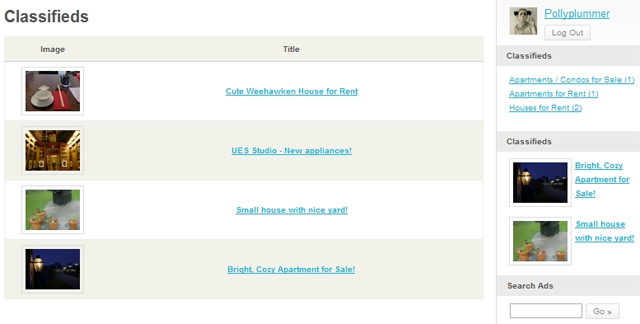
We’ve been adding a lot of new plugins at WPMU Dev Premium this past week and I’d like to introduce you to our new Classifieds plugin. It allows you to add a fully featured classifieds section to your WordPress site. Best of all, it’s built to work smoothly with both Multisite and BuddyPress so that you can create a whole network of localized classified ad sites.
Make Money From Each Classified Ad Listing!
I recently outlined 5 Sure-Fire Ways to Make Money with WordPress Multisite, and you can definitely add Classifieds to this list. Once you set up how much you want to be paid and which categories you want available, your classified listings will be completely automated. Every new post on your classifieds section will be generating income for you!
Classifieds Features:
- The plugin is compatible with WordPress, Multisite and BuddyPress
- The BuddyPress users get a special page in their profiles for viewing and posting Classifieds
- Upload images with ads and resize with easy-to-use cropping tool
- Set time limit for ads to expire in terms of weeks
- Built-in widgets for search, featured ads, and categorires
- Flexible PayPal credit system with multiple currency options
- Easily test crediting system with PayPal sandbox mode before launch
- Set signup credits for all users or send an individual user a set amount of credits
- Send credits as gifts
Perfect BuddyPress Integration:
When using Classifieds with BuddyPress, it becomes a completely natural part of the BuddyPress user menu. The process of creating an ad is extremely user-friendly and intuitive, so your users won’t be left hanging on any step.
The Classified ads plugin is one of the easiest ways to monetize a successful online community.
If you’re great a promoting your own community but have little time left over for additional money-making efforts, then this is a great add-on for you. You can easily create a site completely dedicated to classifieds or simply add it as a new section / page to your site. In either case you’re going to be making more money by offering a service to your users. Charging them for ads is optional, so if you want it to be a free feature offered as an incentive for membership, you can do that, too. Find out more at the Classifieds plugin homepage.
Daily Tip: WordCamp Central Launches New Blog
September 29, 2010
The WordCamp Central website has launched their new blog to help you stay up to date with news about upcoming WordCamps and other community-driven WordPress events.
Wondering if there’s a WordPress event near you? Check out the schedule on the WordCamp Central site. Subscribe to the new blog or follow WordCamp on Twitter for the latest news.
WordPress for Non-Profits: The Complete Guide
September 29, 2010
WordPress is perfect for nonprofits. I know, I used to work for one – we didn’t use WordPress. I wish we had.
In the past web design may have been the domain of people with a design degree but nowadays it’s easy for anyone to get online. A tight budget and limited funds do not mean that you need to be stuck with a limited website. We all know that, right? We’re living in the age of Web 2.0 and Open Source software! Anyone can get online and get a website up and running for virtually nothing, and WordPress is ideal for that!
Here are some of the things that many non-profits need out of their website:
- Easy to update
- Easy to maintain
- Easy to customize
- Quick learning curve
- Cheap
- Good support network
Sound like an Open Source platform we’re all familiar with?
Cool, so here’s the complete guide for why WordPress is the right solution for your non-profit site.
First up here’s a slideshow by Jason King about why nonprofits should use WordPress:
Feel like you’ve learned something already? Good!
So here’s 10 more reasons for non-profits to use WordPress:
1. WordPress is free
I guess this is a pretty obvious one to start with but it’s so pertinent for nonprofits that it really is one of the most important reasons. A nonprofit employee has a board to convince about every little thing they do and if something is free then they’re usually much happier for you do just get on with it. Go to your board with WordPress and you’ll be able to convince them easily that:
- You can build/revamp your website;
- It won’t cost that much.
While it’s true that many of the free things in life – free toys in cereal boxes, free gifts with your stationary order – are kind of rubbish, WordPress is one of those things that is free and fantastic at the same time. Being free doesn’t make it any less powerful or desirable than its commercial counterparts, and many experts now recommend WordPress for nonprofits ahead of other Open Source platforms such as Drupal and Joomla. With very little tweaking WordPress can be developed into a powerful Content Management System.
Okay, so you are still going to have to pay for your hosting and domain registration but these costs are pretty small. There are hosting companies that offer reduced rates (and sometimes free!) web hosting for nonprofits. It’s a good idea to shop around to see what you can find.
Tip: Use a volunteer – even if a nonprofit has no member of staff who feels confident setting up a WordPress site, there may be a member or supporter who has the time and the knowledge to do it. Students are particularly good to extract time from, I find :)
2. Plugins, Plugins, Plugins
Plugins are where it’s at. It’s Plugins that make WordPress so flexible. While an all-in-one CMS might seem like an attractive option for out-of-the-box ease, you may find that it’s laden with features that you don’t need or use, or that it doesn’t have quite the features that you want. Every nonprofit website will need similar SEO & CMS tools but they will all have different goals and specific needs. The huge number of Plugins means that WordPress can be customized to the exact specifications of any nonprofit.
Time for a list within a list? Yes! I know it’s what you want.
Here are five great Plugins for nonprofits:
- Event Registration – Fundraising events, lectures, parties, classes, whatever event you’re organizing, the Event Registration Plugin can save you hundreds (if not thousands) of dollars on event management tools. It was designed specifically with nonprofits in mind. Registration can be done directly through your website, information can be exported to excel and secure payments can be made via Authorize.net, GooglePay or PayPal.
- – if you’re a charity then you may rely upon donations to keep going. From experience, I know that you need to make donating as easy as possible. Any sign of difficulty can put potential donors off. Having a button on your website makes it super-easy.
- Domain mapping – with the integration of multisite with WordPress 3.0 it couldn’t be easier for nonprofits within an umbrella to have centralized web management while maintaining their own identity. A plugin like domain mapping will let each smaller organization have its own domain. This can save on hosting fees, maintenance and means that all you need is one techie to serve all the different organizations.
- Mailchimp Plugin – Having a solid mailing list is the backbone of any nonprofit. It’s important to be able to quickly email news and campaigns to members and supporters. In order to get that mailing list you need to make it easy for people to sign up. The Mailchimp plugin allows users to sign up for your mailing list directly in your website.
- WordPress Multilingual CMS – Many nonprofits operate internationally or with a wide audience speaking a number of different languages. WPML can transform any site into a multilingual site. It’s free but has options for premium membership and paid professional translation.
3. WordPress is Open Source
Open Source means increased flexibility for designers working with WordPress. It means your designer is able to access and make changes to the code, adapting it to a specific nonprofit’s needs. It also means you don’t have to pay to license it – see 1 :). Okay, so if you’re just setting the site up and intending to let it run without worrying about the code then you may think that WordPress’s open source-ness doesn’t have a massive effect on you.
Well, it does. It means that there are hundreds of developers working on WordPress all of the time making it better for you to use. What other piece of software has such an enormous, dedicated community of developers working away all for the love? And who could benefit more than people who have little money and tight budgets?
4. It can be used as a Content Management System
It’s still a misconception that WordPress is simply a blogging tool – it gets lumped in with other blogging platforms such as Blogger and Typepad. As anyone with a little bit of knowledge of the platform knows, it is so much more.
Some WordPress CMS features that you can use from the initial installation and that are useful for any nonprofit:
- Intuitive, well laid out back end
- Easily add and manage pages
- Media gallery with content that is easily embeddable
- Add multiple users with different privileges
- Easy to use editor
- Set static front page
Tip: If you are thinking about introducing WordPress to your nonprofit I suggest referring to it as a CMS rather than as a “blog.” Unfortunately there are various prejudices about blogs, especially amongst people who don’t use them. For a quiet life it’s better to just say CMS – which, of course, WordPress is.
A rubbish cartoon to illustrate my point:
Gettit?
You can read more about customizing WordPress as a true CMS here.
5. Easy to use
Many nonprofits have a small number of dedicated staff stretched to their absolute limit. There are others which are simply run by a team of volunteers. Whatever website platform is used it needs to be easy to use with a quick learning curve that can be picked up while juggling a number of different tasks.
When I worked on a nonprofit there was pretty much just me managing everything in the head office – accounts, web, fundraising, research management, administration, etc etc etc. The website ended up being built with Joomla! – I was able to edit and add pages but I never found it intuitive. I also didn’t have the time to learn anything about it. Since then I’ve self-taught myself the ins-and-outs of WordPress and found it to be much easier to grasp than Joomla. And if I can, anyone can!
WordPress is very easy to use. If you can use a word processor then you can use WordPress. Anyone will a little bit of training and encouragement can get it.
Tip: If you can’t afford to send your employees on a dedicated training course then allow them to set aside some time every week to hone their WordPress skills. You can find training videos and tutorials at the following sites:
Another Tip: One thing every new WordPress user should know – never cut and paste directly from MS Word to WordPress. MS Word has an annoying habit of picking up all sorts of formatting code when you copy from it. (editing note: I start ranting here, just ignore if you want :) )I told my husband this and he didn’t believe me. Off he went, cutting and pasting from MS Word straight into his blog. Then he was like “There’s something wrong with my blooooggg. Will you fix it pleeeasseeee?” So stupidhead here has to spend an evening stripping all the formatting out of all of his blog posts and reformatting them. You think that was fun? Do you?!!?
Anyway….. you will not have a fun time tidying it up. And you’ll be seething with resentment for a long time afterwards. I always paste into notepad before pasting anything from Word. WordPress does have a “Paste from Word” tool which takes care of stripping all that formatting for you.
6. Themes
While all those developers are beavering away at WordPress’ backend, there are thousands of designers working on themes to make your WordPress installation look beautiful. Whatever your requirements you’ll be able to find a theme to suit your organization – if cash is really tight you’ll be able to find a free theme which you can customize, with a bit more cash you can use a Premium theme, or if you’re feeling flush you could employ a designer to make a custom theme for you.
If you can’t afford a Premium or custom theme don’t stress! It’s often easy to customize a free theme to suit a small nonprofit. It’s also easy to change your theme so if something isn’t working out for you just switch to another one.
Here are some nonprofits doing their thing with WordPress:
Global Voices
Teach for Us
7. Support
The WordPress community is a pretty snuggley one. It’s a non-threatening environment in which complete novices have resources to be able to solve their own problems. The WordPress Codex is a more extensive support manual than is provided with most CMS. There are also support forums which users can post on to get advice. Not to mention the huge amount of blogs about WordPress out there. Type any problem you have into Google and you can bet that someone else will not only have had that problem but have blogged about it.
8. Monetize
Advertising is often a dirty word. Many people don’t want to put adverts on their site and they’re lucky to be in the position if they don’t have to. But if you are a nonprofit trying to generate income from your website then something like Pay Per Click (PPC) advertising can help you out. It’s simple to do, there are plugins that will take care of it for you, and you can create income without investing money. A service like Google Adsense will only place targeted adverts on your website, based upon categories that you have determined beforehand. This is important as any nonprofit will have an ethics policy and adverts will have to meet any standards that have been drawn up. There are a number of different advertising plugins that can help you to insert your adverts into your website.
You may find that your website visitors are more than happy to click on your advertising links – it’s a way for them to help you out without having to dig into their own pockets. If you work for a nonprofit where your supporters have no money that can be important!
9. Integrate with Social Media
A solid membership or supporter base may be what enables a nonprofit to continue running in straitened financial times such as we’re in right now. Thankfully we’re also living at a time when connecting with people couldn’t be easier. Social media such as Facebook and Twitter should be top of the list when it comes to nonprofits reaching out to their members. Why? Because, like WordPress, they’re free and easy to use. Also, everybody uses them. For info on why and how to use social media tools you can check out Non-Profit Tech 2.0 A Social Media Guide for Nonprofits which has useful resources on how a nonprofit can make the best use of social media.
For our purposes – why every nonprofit should use WordPress – it suffices to say that all of these social media platforms are easy to integrate with WordPress. Whether you want to grab code from Twitter or Facebook and dump it in the WordPress text widget, or whether you want to use a dedicated plugin, WordPress enables you to develop a cohesive outreach policy that encompasses all of your social media.
Tip: Use a Share button plugin at the bottom of every page and post to enable visitors to share your content with people on their social network.
10. Dynamic Content
Last, but not least, is dynamic content. Just like you should be using social media to develop a community around your nonprofit, your website should be a dynamic place that people keep coming back to. Back in the Dark Ages of Web 1.0, a website was pretty much a shop front, a place for one way communication from the organization to the website visitor. Web 2.0 lets people get involved, it’s a community meeting place where people can be kept updated and comment. While the content on your site should not change every day, you should be updating it with news and blog posts about what your nonprofit is up to. WordPress does this easily, and with a plugin like the Almighty All-in-One SEO Pack you can make sure that all of your posts are optimized for search engines.
Convinced yet? You should be. WordPress is such a powerful, exciting platform that I would be using it even if I were a millionaire. If you’re a nonprofit and you’re not using WordPress then you’re missing out on an exciting tool that could expand your organization and revitalize your website.
Time to learn more? Watch this video of a talk given by Amanda Blum at WordCamp. It should either convince you that you should be using WordPress or show you how to convince other people. Amanda, like me, dislikes Powerpoint – that’s a good starting point right there. Enjoy!
Expand BuddyPress RSS Feeds to Increase Collaboration and Participation within Your Community
September 29, 2010
A new BuddyPress plugin is available that greatly expands the platform’s RSS feeds for nearly every activity that happens within a BuddyPress community.
BP Lotsa Feeds comes to you courtesy of Boone Gorges and it adds 13 new RSS feeds to your BuddyPress site.
I’m not going to list all of them, but here are few of my favorites that I think will be especially useful:
- Networkwide blog posts by an individual member
(/members/username/activity/blogposts/feed) - Forum topics started by an individual member
(/members/username/activity/forumtopics/feed) - All forum activity by a member (a combination of the previous two feeds)
(/members/username/activity/forums/feed) - A group’s activity updates
(/groups/groupname/updates/feed) - A group’s new members
(/groups/groupname/membership/feed)
After you install the plugin, the feeds are automatically available. There’s nothing to configure, unless you want to make some of the feeds inaccessible. You can do this by adding this to your wp-config.php file:
define( 'BPLF_DISABLE_GROUP_UPDATES_FEED', true );
This plugin is really useful if you’re using BuddyPress to manage an educational community or learning environment. It enables students to subscribe to their own forum topics or forum activities within a given group.
Additional RSS feeds also come in handy if your BuddyPress site is a directory for businesses, professionals, websites, or any community where users may want to actively monitor specific activity, such as a member’s friendship connections or a group’s new members.
The Benefits of More Specific RSS Feeds:
Having more RSS feed available helps to increase collaboration and participation. Users don’t have to log in and sift through everyone’s updates and posts to find something of interest. Instead, members can target their subscriptions to keep themselves in the loop by subscribing to the feeds that they find to be the most useful, even if that is for a short period of time.
Because of the massive amounts of information posted on social networking and community sites, people are desperately looking for ways to filter their social streams. A more narrowed RSS feed gives the user this opportunity and frees him up to be a more active participant in discussions. Offering more feeds will help your users keep from getting overloaded by too many activity and content updates. You can find out more on the plugin’s homepage at Boone’s site.
Daily Tip: Don’t Forget to Vote for BuddyPress in the 2010 Open Source Awards!
September 28, 2010
BuddyPress was announced as a finalist for the Most Promising Open Source Project. Voting began yesterday and will be open through Friday, November 5th.
Make sure to get your vote in before the deadline!
How to Upgrade Your WordPress Site to Use Asynchronous Google Analytics Tracking
September 28, 2010
Nearly every WordPress site has Google Analytics tracking code on it in order to capture valuable information about website traffic and marketing effectiveness. Google has made improvements to its tracking method within the past year and you will need to upgrade on your end in order to take advantage of the new asynchronous tracking.
What is Asynchronous Tracking and why would I want it?
Asynchronous tracking is an improvement to Google’s previous tracking code. It takes advantage of browser support for asynchronous JavaScript to enhance the speed in which the tracking code is loaded. This means the analytics tracking can be done at the same time as rendering other content, so that the tracking code will not cause delays on your page. Essentially, it helps your pages to render faster. Google lists the advantages as:
- Faster tracking code load times for your web pages due to improved browser execution
- Enhanced data collection & accuracy
- Elimination of tracking errors from dependencies when the JavaScript hasn’t fully loaded
If you’re still using the old tracking method, there’s no reason to put off switching. It’s very easy to change to asynchronous tracking, whether you’re adding the snippet yourself or using a plugin.
Two Ways to Upgrade to Asynchronous Tracking on WordPress:
Option 1: Change or Upgrade Your Plugin
If you’re using a plugin to add tracking code, change to one that supports asynchronous tracking. As far as I know, the only two plugins that currently support the asynchronous tracking method are:
Google Analytics for WordPress by Joost de Valk
Asynchronous Google Analytics for WordPress by Bambang Sugiarto.
If you’re already using one of these but have been lazy about upgrading your plugins, make sure you get the latest version. If you’re using a different plugin to add your analytics tracking code, you may want to consider switching to one of these so that you can take advantage of the best tracking method available.
Option 2: Manually Add the Snippet
If you don’t want to use a plugin, or if you’ve already manually added the tracking code to your site, you will need to update your snippet to use asynchronous tracking. Check out Google’s guide to Getting Started with the Asynchronous Snippet. Copy the snippet from this page and replace the UA number with your own. Google recommends that you insert the new snippet at the bottom of the
section of your pages, after any other scripts your page or template might use. Of course, you’ll want to remove your old snippet.The most important reason to upgrade is to improve your loading time. Your page loading time affects your ability to capture your visitors’ attention. Anything you can do to shave off even one second of time on loading is going to be a valuable improvement to your site. Don’t wait to upgrade your tracking code. Now that you know how easy it is, you can handle it in under five minutes.
Inserting adverts all over your WordPress network with Simple Ads
September 28, 2010
So you’re in charge of a WordPress Multiuser site and you want to include adverts on the blogs in your network. You also want to be able to stop your users changing them whenever they want.
Maybe in the past you’ve used the Supporter Advertising plugin but people keep discarding your adverts. With the Simple Ads plugin only the Super Admin can change the adverts. That means you’re the boss and your pesky users can’t go fiddling around with the ads (don’t you just hate it when they do that?)
Download the plugin from WPMU DEV, upload and activate it. Once it’s ready you’ll find “Advertising” in the Super Admin menu.
When you set it up you can decide where the adverts are displayed with the following options:
- Before post content
- After post content
- Before page content
- After page content
I’ve decided that I want my ads to appear after the post content. I could put them before and after but that would be overkill, methinks. Got to make sure I’ve got a nice balance of happy bloggers + good cash flow. I set it up as follows:
You also have the option of showing or hiding ads on your main site. Since you’re in charge you might not feel like having adverts on your blog, just let the rest of the network display them for you.
Once you’ve dumped the code in the right field you can select “Save changes” and the adverts should appear like so:
Remember: if you’re using Google Adsense and have just generated the code, it can take up to 10 minutes for the ads to appear. If no adverts are appearing don’t panic! Just breathe and wait it out. :)
You can download the Simple Ads plugin from the WPMU DEV website.
So, when exactly are Microsoft going to buy Automattic?
September 28, 2010
You don’t have to be a rocket scientist to figure out it’s going to happen – here’s the case for it:
- Back in November 2009 Matt Mullenweg is the star guest for the Windows Azure presentation
- Then earlier this very month we have the transfer of the WordPress trademark away from Automattic as ‘Automattic might not always be under my [Matt's] influence’
- And now we have the small matter of 30 million Windows Live users going to wordpress.com
It’s all a bit too snug wouldn’t you say!
Not that there’s anything wrong with being purchased by MS, although I’m sure there are plenty in the community that would say otherwise (I wouldn’t be one though).
If I had to make a guess, I’d say that the original plan was to sell to Yahoo, prior to Yahoo’s general collapse, and that now the eyelids are fluttering at MS… and I’m just going to speculate wildly here, but maybe for a $500m+ deal.
So whaddya reckon – am I right or am I right?
[rant] Why on earth can’t we charge people like my gym can!
September 27, 2010
Just a short break from our usual programming for me to complain…
You see, as you may have gathered, we run WPMU DEV, and what’s the biggest problem with WPMU DEV from your perspective?
Yep, thought so, cost!
And I couldn’t agree with you more, $79 p/month is a chunk of change in anyone’s book, I mean it’s worth every cent, and you’re not going to get a team of the best WordPress, BuddyPress and Multisite plugin and theme developers on the web for nothing, but $79 is still a lot of money!
Which is why we provide the option to join for less than $35 p/month… which is much more affordable isn’t it.
But of course, we have to take all those payments upfront for the next 12 months… which is $419… which feels a lot less affordable all of a sudden huh :(
Which sucks!!!
I want to offer WPMU DEV to everyone just like you would an iPhone plan, or cable TV, or a gym membership, or a rented fridge, or a PO Box, or just like anything in the real world.
We should be able to provide membership for $35 per month for a 12 month contract, heck we shoudl be able to provide it for $24 per month for 24 months!!!
How cool would that be huh, Dev membership for $24 p/month!
But of course we can’t :(
It’s the biggest suck about running an Internet business like WPMU DEV, and whoever sorts out how we can do this is going to make an awful lot of money themselves.
Come on PayPal [especially PayPal as we already use you!], Amazon, Google etc. I don’t care if it’s US only at first (worldwide would really rock out though :), but we need enforceable, long-term, monthly-payment based subscription contracts… if my local gym can do that to me (they can, and do) then I should be able to do that too.
It can’t be that hard, just capture some ID with payment and then have a default system whereby if people cancel they need to pay a cancellation fee or get ‘debt collection’ emails / letters and a black mark on their credit rating – just like a regular business.
Pretty please, I’ll pay serious extra fees and all that.
Oh, and if anyone out there has a solution that could work for us, then you get a free lifetime membership :)
Or, this would be the perfect payment startup, honestly, think about it – Edublogs could be $3.50 per month for Pro, so many services that currently require a big upfront payment for cheaper monthly rates could be so much more affordable.