Turn WordPress Into a Complete CMS For Newsrooms and Multi-User Blogs With Edit Flow
May 4, 2010
I’d like to introduce you to one of the best tools available for managing editorial workflow within WordPress. If you have ever tried to use Wordpress through an edited and tiered composition process, then you already know the limitations and bulkiness one must endure in attempting to collaborate. Sure, the “draft” feature lets you save a work in progress or schedule its publishing but it’s hardly a complex set of tools for the modern day Wordpress Editorial Desk.
Enter the Edit Flow Project! This group of developers has created a customizable plugin that allows multiple users to comment, make recommendations, brainstorm together, leave editorial comments and much more.One of the main purposes of the Edit Flow plugin is to empower newsrooms, blog networks and multi-user blogs to manage more of their editorial workflow from within the WordPress admin.
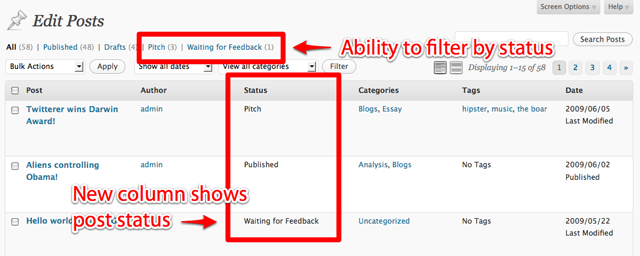
As you know, the default WordPress admin doesn’t naturally lend itself to works in progress and collaboration. The only distinctions available on a post in process are “draft” or “pending review.” Edit Flow expands the scope of your collaborative pieces with additional post statuses: assigned, pitched, and waiting for feedback.
One of the coolest features of the latest Version 0.2 is the Quick Pitch dashboard widget for tossing around story ideas and adopting the “pitch” status for a post.
With Edit Flow plugin, you can easily work collaboratively on several projects in different stages of completion, as well as hash out new ideas in a group setting on the go. This can save a virtual newsroom lots of time from concept to post; it also eases the transition from print to online media.
The best thing about Edit Flow is that it is still actively in development, which means more tasty features to come! Some of the new functions being considered include:
- More granular email notifications, including the ability to have a notification go to a predefined group of people
- User groups with functionality to define specific groups of users within WordPress. For instance, a user could be included in a writer’s group and have the ability to pitch new assignments or be included in a copy editor’s group and have the ability to mark pieces as “copy edited.”
- Visualization of the editorial workflow data within WordPress, let it be through a calendar view, an activity stream, or other.
- The ability to define newsroom-specific metadata for each post.
- Functionality to allow custom definition of a required set of actions for each piece. These could be “copy-edit,” “fact-check,” etc.
If you’re struggling to manage a multi-user blog or collaborative team with your current dashboard capabilities, let Edit Flow harness the power of WordPress publishing for you. If you’ve used this plugin before, feel free to give it a little mini-review in the comments and let us know your thoughts.
Daily Tip: How to Remove the “BuddyPress is Ready” Message in the WordPress Dashboard
May 3, 2010
If you haven’t noticed, when using your own theme for BuddyPress, you will sometimes get this message:
“BuddyPress is ready. You’ll need to activate a BuddyPress compatible theme to take advantage of all of the features. We’ve bundled a default theme, but you can always install some other compatible themes or upgrade your existing WordPress theme.”
Kind of an annoying message to see all the time in your dashboard, isn’t it?
Quick Fix: To remove the “BuddyPress is ready” message you will need to add a “buddypress” tag to your theme. You can do this by editing the style.css file of your active theme and adding the tag to the “Tags:” line in the comment header.
The ultimate WPMU / WordPress theme pack is now ready to download!
May 3, 2010
Well, it’s been a while in coming, but we’re delighted to announce the release of the latest Farms theme pack, and we think you’re going to like it!!!
Introducing the 133 WPMU & WordPress Theme Pack!
Yep, you read right, we’ve added 33 new themes, but more importantly we’ve spent literally months working on every single theme to ensure that this is by far the highest quality theme pack we’ve ever released.
Probably the most important thing about this pack is that we’ve paid a massive amount of attention to consistency.
So, for example, every page allows comments… but when comments are turned off it doesn’t show ‘Comments are closed’ – just a nice professional looking nothing :)
But that’s hardly scratching the surface, because also…
Every single theme is 100% WordPress 3.0 ready, and utilizes all of the fantastic features that have appeared in the 2.x WP releases, including.
Custom headers wherever they can be included, have been… in fact over 100 themes have them!
Every single theme has been customized (extensively!) to support threaded comments.
Of course every theme is 100% widgetized and completely internationalized.
Did I mention that each theme also supports post thumbnails.
And contains perfect gallery CSS.
Tags included too!
And on a technical front, we have:
- replaced PHP_SELF call in search to bloginfo(‘url’) *security issue
- added load_theme_textdomain() to all themes
- replaced the hardcoded footer ‘hosted by..’ main site link to auto fetch a link to the main site
- replaced timthumb usage in some themes to auto fetch thumbnail images
- separated comments and pingback with custom wp_list_comment call, so you can turn off trackbacks if not used
- replaced the hardcoded date time call to wordpress built in gmtdate()
- added missing wp_head() and wp_footer() in some themes
And, of course, we now support every single theme through our support and upgrade guarantee, so if you have any problems, bugs or issues we will immediately fix them for you. 100% supported, 100% guaranteed.
No more compatibility issues, bugs or theme headaches.
So I think you’ll agree, this is one pretty huge and wonderful, and you can download the pack here.
8 of the Best Free BuddyPress Themes Available
May 3, 2010
A few new BuddyPress themes are popping up on the scene and we’re featuring a few of them today. Free BuddyPress themes are still somewhat scarce, as it’s a new platform that WordPress designers have been hesitant to get into, even the premium theme makers. However, the BuddyPress community is growing and we’re sure to see more themes in the coming days. I hope this roundup saves you some time searching if you’re new to BuddyPress and looking for free themes. All of the themes featured here are compatible with BuddyPress 1.2.x.
Blogcaster BuddyPress Theme
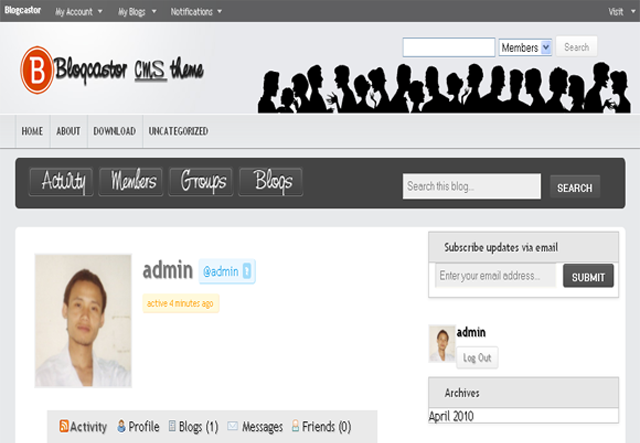
This is one of the newest BuddyPress themes available for free at Blogcaster.com, along with a matching WordPress CMS and bbPress theme.
Download Theme
Malleable
Malleable is a child theme for the Hybrid theme framework.
Download Theme
Unplugged
This is a dark child theme for BuddyPress, created by Diesel Laws.
Download Theme
Cosmic Buddy
This is a clean, Orkut-inspired theme that includes seven different widgetized areas and an easily customizable logo image. It was created by Brajesh Singh of BuddyDEV, one of my favorite BuddyPress ninjas.
Download Theme
Fishbook
Fishbook is a Facebook-inspired BuddyPress theme created by Michael Kuhlmann.
Download Theme
Jukt Micronics
This is another theme from Michael Kuhlmann, available at the WordPress theme directory.
Download Theme
Jet Green Theme
This theme includes seven blocks widgets and is available from Cosydale.com. The site is in Russian but it’s packed full of BuddyPress info, so it’s worth checking it out.
Download Theme
BP Nicey
BP Nicey is another theme from Brajesh at BuddyDEV and is created to be very easily customizable.
Download Theme
BuddyDress
If you’re interested in a professionally-supported theme with loads of easy-to-use options, then check out BuddyDress.com. BuddyDress has best premium themes available on the market with support that is second to none.
Visit BuddyDress
Daily Tip: How to Add a Dynamic Copyright Date in the Footer
May 2, 2010
Do websites with outdated copyrights bother you? Don’t let that be you! This snippet will help you keep your copyright updated from year to year. Just set the first date and you’re good to go.:
<p>copyright © 2007-<?php echo date('Y'); ?> mywebsite.com</p>