


Blog Like Shakespeare: 3 WordPress Plugins That Will Improve Your Writing
November 17, 2011
Don’t you just hate those bloggers who kick the English language around like a rabid dog?
You know the type – they confuse ‘your’ and ‘you’re’, invent their own words, disregard grammatical convention and don’t even bother checking their copy for glaringly simple spelling mistakes.
I think that what sets great bloggers apart from the squalid masses is a belief in the sanctity of language. A belief that words on a computer screen are no less valuable than words in a book or newspaper, and should be treated with due respect.
Does that sound like you? Good.
These are three WordPress plugins – all free of charge – which will help you write and edit your blog posts to an impeccable standard.
1. After the Deadline
After the Deadline is a wildly popular editing tool written by Automattic, the owners of WordPress.com. This plugin can check for spelling and grammar mistakes in your copy, as well as make suggestions on style and word usage. It’s a very intelligent piece of work, and if you’re not already using it, you should be.
Note: After the Deadline is also available as a browser extension for Chrome and Firefox. If you do a lot of writing outside of WordPress, it might be worth installing ATD directly to your browser instead.
2.WP Synonym
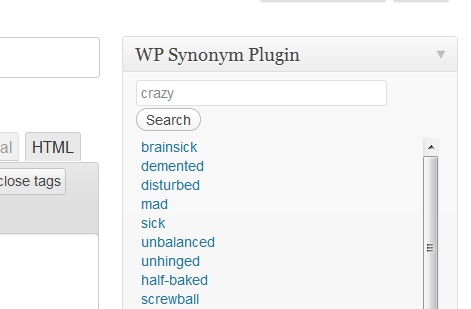
WP Synonym is an ultra-basic plugin that creates a little thesaurus panel next to your WordPress text editor. Enter a word, and the plugin provides you with a drop-down list of synonyms.
Sure, you could just venture over to Thesaurus.com when you need inspiration, but why bother when you can have a word suggestion tool right inside your dashboard?
There are a few different plugins you can use to achieve a similar result – none of which have received many reviews. I picked WP Synonym for the sake of example – you can check out the WordPress Plugin Directory for alternatives.
3. Keyword Density Monitoring
This plugin allows you to check your blog post for the density of a specified word, or set of words. KDM creates a small panel inside your dashboard which feeds you live density numbers as you type.
DISCLAIMER: I’m not suggesting you use a keyword density plugin for any SEO purpose – that would be a waste of your time.
What a keyword density checker CAN do is help you identify words and phrases that you may be overusing in your text. You can use this plugin to quickly locate the words that you need to change and diversify.
Keyword density means sweet f*ck all to your search rankings, but it can certainly have an impact on the readability of your text. Forget SEO – think of this as a Human Optimization tip for your blog content.
Again, there are a few different plugins you could use here – check the directory if you’re looking for a different option.
On the subject of good writing, check out these articles from the WPMU team:
5 Mistakes that Make You Look Stupid
5 MORE Mistakes that Make You Look Stupid
Tips For Dirty Bloggers Pt 4: Grammar, Spelling & Punctuation
Over to you, brave bloggers
Got any tips, tools or tricks that help you write better quality content? Share your wisdom with us in the comment section below.
Thanks to Sim Dawdler, Brian and Alan Cleaver for the images.
Because this plugin/widget is provided free of charge, I simply ask you to link back to Pressography.com in a post on your blog, or from one of your sites. It doesn't need to be anything fancy - just a note saying that you're using it, and whether or not you like it. However, there is no requirement that you do this, you're free to use the plugin regardless.



Comments
Got something to say?